RAM is one of those laptop specifications that looks simple until you start shopping. Two machines can have similar processors and storage, yet feel very different once you open a dozen browser tabs, join a video call and work on a large document at the same time. The useful question is not simply how much memory a laptop has, but how much headroom your normal workload needs.
For most UK buyers, 16GB is the safest all-round choice in 2026. It gives everyday users comfortable multitasking room and usually offers a longer useful life than an 8GB model. That does not make 8GB obsolete: it can still suit light browsing, email, streaming and basic office work when the budget is tight.
What RAM actually does in a laptop
RAM is short-term working memory. Your laptop uses it to keep the operating system, open apps, browser tabs and active files readily available. When available RAM becomes tight, the system relies more heavily on storage for temporary data. Modern SSDs reduce the impact, but they are still not a substitute for having enough memory.
This is why a laptop with insufficient RAM may feel fine with one app open but slow down during real-world multitasking. The processor can be powerful enough, yet switching between a browser, Teams or Zoom, spreadsheets and other software becomes less smooth.
How much RAM do you need for common laptop tasks?
8GB: acceptable for light everyday use
Choose 8GB if your workload is genuinely simple: web browsing, email, streaming, word processing, online banking and light school or university work. Microsoft lists 4GB as the minimum memory requirement for Windows 11, but that figure is about meeting the operating system requirement, not providing generous multitasking headroom. For a new Windows laptop, 8GB is a more realistic entry point.
16GB: the best choice for most people
If you regularly keep many browser tabs open, use Microsoft 365, attend video meetings, study with several apps running or do occasional photo editing, 16GB is the sensible default. In the common 8GB vs 16GB RAM decision, the extra memory mainly buys breathing room. You are less likely to notice slowdowns when several tasks overlap.
It also makes sense if you expect to keep the laptop for several years. Many thin laptops now have memory soldered to the motherboard. If the RAM cannot be upgraded later, buying enough at the start matters more.
32GB: for heavier creative work and demanding multitasking
Thirty-two gigabytes becomes worthwhile when memory-hungry applications are part of your normal routine. Examples include professional photo work, larger development projects, virtual machines, data analysis and serious video editing.
Adobe’s current requirements show why workloads matter. Photoshop recommends 16GB or more, while Premiere recommends 16GB for HD media and 32GB or more for 4K and higher-resolution work. Not every creator needs 32GB, but heavier media work can demand substantially more memory than everyday office tasks.
64GB or more: specialist territory
Most laptop buyers will not benefit from 64GB. It is mainly for multiple virtual machines, advanced 3D work, very large media projects, scientific or engineering workloads, and other professional tasks where high memory use is expected. Buying 64GB “just in case” usually gives poor value if your software never needs it.
How much RAM does a gaming laptop need?
For a modern gaming laptop, 16GB is a strong baseline. It leaves room for Windows, game launchers, voice chat, browser tabs and background utilities as well as the game itself. Gamers who stream, edit video, run heavily modded games or keep many applications open may prefer 32GB.
Do not judge a gaming laptop by RAM alone. The GPU, VRAM, CPU and cooling system usually have a larger effect on frame rates. On laptops using integrated graphics, some system memory is shared with the graphics hardware, reducing the headroom available to other applications.
A practical example: choosing between two similar laptops
Imagine you are comparing two laptops for university and general home use. One has 8GB of soldered RAM and costs less; the other has 16GB and cannot be upgraded either. Your normal day involves Chrome with many tabs, Word, Spotify, cloud storage syncing and several video calls.
The 8GB model may handle each task individually, but the 16GB version is likely to feel more consistent when everything is open together. Paying for more memory is not about making Word twice as fast. It is about reducing the chance that the whole system becomes constrained during ordinary multitasking.
Check upgradeability before you buy
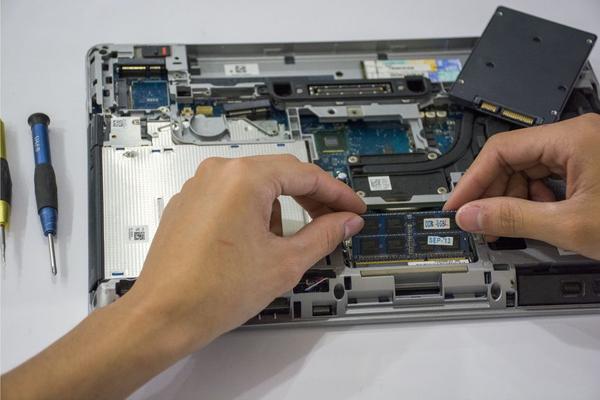
Some laptops have removable SO-DIMM modules that can be upgraded, while many slim models use soldered memory that cannot be changed. Others combine soldered memory with one upgrade slot.
Before buying, check the manufacturer’s specification page for the maximum supported memory, number of slots and whether any RAM is soldered. If an 8GB laptop is easily upgradeable, starting lower can be reasonable. If memory is permanently fixed, 16GB is often the safer long-term purchase.
Does faster RAM matter as much as capacity?
Memory speed can affect performance, particularly on systems using integrated graphics, but capacity usually matters first. Moving from too little RAM to enough RAM can noticeably improve everyday responsiveness. Moving from adequate RAM to slightly faster RAM generally creates a smaller difference for typical browsing and office work.
For most buyers, choose the right capacity first, then compare memory speed alongside the processor, storage, display quality and battery life.
FAQ
Is 8GB RAM enough for a laptop in 2026?
Yes, for light browsing, streaming, email, documents and basic study tasks. It is less ideal for heavy multitasking, creative software or buyers who want plenty of long-term headroom.
Is 16GB RAM overkill for normal use?
No. For many buyers, 16GB is the most balanced choice because it supports comfortable multitasking without moving into expensive specialist configurations.
Do I need 32GB RAM for gaming?
Not usually. Sixteen gigabytes suits many gaming setups, while 32GB is more attractive for streaming, modded games, content creation or heavy multitasking alongside gaming.
Can I upgrade laptop RAM later?
Sometimes. Traditional SO-DIMM memory may be replaceable or expandable, but soldered RAM cannot be upgraded. Always check the exact laptop model rather than assuming an upgrade is possible.
Choosing the right amount
Think about the busiest version of your normal day, not the lightest. If your laptop is mainly for browsing and documents, 8GB can still be enough. For most students, office users and general buyers, 16GB offers the best balance of comfort, longevity and value. Move to 32GB when your regular work genuinely involves demanding creative applications, development tools or large multitasking loads, and reserve 64GB for specialist needs you can clearly identify.
Finally, factor in upgradeability. A cheaper 8GB model with accessible memory slots can be a better long-term option than a fixed 8GB design, while a soldered 16GB model may be safer if you plan to keep the laptop for years. Getting RAM right is one of the easiest ways to avoid buying a laptop that feels cramped before its time.