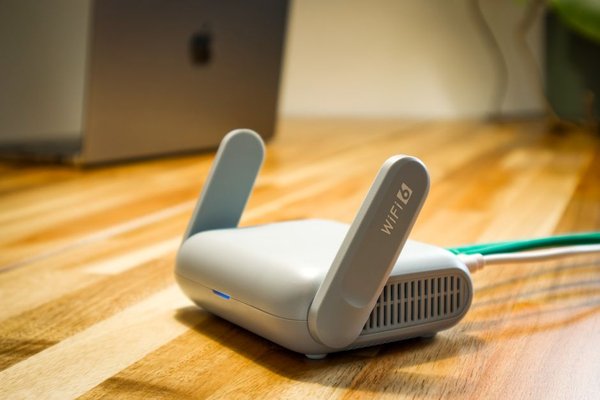
The bedroom has two bars of Wi-Fi, video calls freeze in the upstairs office, and the router works perfectly in the living room. Should you buy a Wi-Fi extender or replace the setup with mesh Wi-Fi? Both can improve Wi-Fi coverage, but they solve slightly different problems. The better choice depends less on the advertised coverage number and more on where your weak spots are, how you move through the house, and what speeds you need there.
The Quick Verdict: One Dead Zone or Several?
Choose a Wi-Fi extender when your existing router works well almost everywhere and one nearby room needs a stronger signal. It is usually the less expensive, less disruptive fix.
Choose mesh Wi-Fi when several rooms or floors struggle, devices regularly move around the house, or you want coordinated coverage from multiple access points. A mesh kit generally costs more, but its nodes are designed to work together rather than operate as an isolated signal relay.
Neither option can repair a slow internet connection from your provider. Before buying, test speeds beside the router and in the problem rooms. If speeds are poor even beside the router, investigate the broadband connection or router first.
How Each System Gets Wi-Fi Into Weak Rooms
Wi-Fi Extender: A Relay for Your Existing Router
A conventional wireless extender connects to your router over Wi-Fi and rebroadcasts connectivity farther away. You normally keep the router you already own. Some extenders create a separate network name, while others can use the same name or work with compatible roaming features. The exact behavior depends on the model.
The catch is placement: an extender cannot turn a barely usable incoming signal into a fast, reliable connection. Put it where it still receives a solid signal from the router, usually somewhere between the router and the dead zone, not inside the dead zone itself.
Mesh Wi-Fi: Several Coordinated Access Points
A mesh system typically uses a main router or primary unit and one or more satellite nodes. They cooperate to offer broader coverage under a common network name, with centralized settings and features intended to help devices roam. Actual handoffs still depend partly on the phone, laptop, or other client device.
Mesh nodes must also communicate with one another. That connection is called backhaul. It may use Wi-Fi, Ethernet cables, or a combination, depending on the system. A distant wireless node with a poor backhaul connection can be just as disappointing as a badly positioned extender.
Wi-Fi Extender vs Mesh: The Differences You Will Notice
Speed and Reliability
A basic extender that receives and retransmits traffic on the same wireless channel shares airtime between those jobs. This can noticeably reduce usable throughput, especially with a weak router-to-extender connection. It is not accurate to say every extender automatically halves your internet speed: results vary with bands, radios, interference, and client activity.
Mesh does not guarantee full speed either. Dual-band wireless nodes may share airtime for backhaul and connected devices. Tri-band designs can provide extra capacity for backhaul, while Ethernet backhaul avoids using wireless airtime for the link between wired nodes. If you already have Ethernet in the walls, that advantage is worth considering.
Roaming From Room to Room
With some extenders, your phone may hang on to the weaker router connection or need to switch between network names. Newer extenders with compatible mesh-like features can improve this, so the distinction is not absolute.
Coordinated mesh systems usually offer a smoother experience for people walking between rooms on a call. Still, a single network name does not force every device to switch at the perfect moment. Roaming assistance and client behavior both matter.
Cost, Setup, and Upgrades
An extender is often the budget-friendly choice: plug it in, pair it with the router, and check its signal indicator. It also lets you keep equipment supplied by your internet provider. Mesh kits require a larger initial purchase and may involve replacing the router or putting the mesh into access-point mode behind it.
Many mesh systems simplify management through one app and support adding compatible nodes later. Units from different product families, even within the same brand, may not form one mesh. Check the manufacturer’s compatibility list.
Match the Fix to Your Floor Plan
A Small Flat With One Weak Bedroom
Imagine a router at one end of a flat and a bedroom behind a hallway wall. The kitchen and lounge already have good speeds. A carefully placed extender in the hallway may solve the bedroom problem cheaply. If there is an Ethernet socket in that bedroom, a wired access point could deliver an even stronger result.
A Two-Storey House With Several Trouble Spots
Now picture a house where the router sits downstairs, the upstairs office drops calls, and the far bedrooms struggle to stream. One extender might fix the office without fixing the bedrooms. Two or three well-positioned mesh units are often a more sensible whole-home approach, particularly when you can connect an upstairs node by Ethernet.
Try These Checks Before Spending Money
First, move the existing router away from the floor, metal cabinets, and large appliances if its cabling allows. A more central, open location can make a meaningful difference. For practical guidance, look for router placement tips tailored to your home’s layout.
Second, compare the same device’s speed and responsiveness in three places: beside the router, halfway toward the weak room, and inside that room. Test at similar times so changing network congestion does not confuse the results. Learning how to test Wi-Fi speed helps separate a coverage problem from an internet-service problem.
FAQ
Is mesh Wi-Fi always better than a Wi-Fi extender?
No. Mesh is usually more convenient for coordinated coverage across multiple rooms, but an extender can be perfectly adequate for one modest dead zone. Buying a mesh kit for a single weak corner may be unnecessary.
Will a Wi-Fi booster vs mesh comparison change for gaming?
For gaming, consistency and latency matter more than signal bars alone. A wired connection is preferable when practical. If you need wireless, a strong mesh node with Ethernet backhaul can be a better fit than a basic wireless repeater, but test your actual connection.
Can I use a Wi-Fi extender with a mesh system?
Sometimes, but a conventional extender may operate outside the mesh’s coordinated roaming system. A compatible mesh node is generally the cleaner way to expand an existing mesh network. Verify model-specific support before buying.
Does mesh Wi-Fi make my broadband faster?
It cannot raise your internet plan’s maximum speed. It may help more rooms get closer to the speed available at the router by improving local wireless connections, particularly with well-placed nodes and good backhaul.
Which One Should You Buy?
For a single room with a weak signal and a reasonable budget, start with a well-positioned Wi-Fi extender. For a larger, multi-floor home with several problem areas, mesh Wi-Fi is usually the more flexible investment. Before choosing, map the weak spots, compare speeds near and far from the router, and check whether wired backhaul is possible. Better coverage comes from a strong path back to the router, not simply from adding more boxes.